Field reporting without the typing
Jobsite Reporting Built For Crews In The Field
If they can talk, they can report. No app training, no typing, no chasing.
- One button. Talk. Done.
- Zero training, if your crew can leave a voicemail, they can use SpeakEzee
- Works with gloves on, from the tailgate, in the parking lot
Get your crew reporting today
Set up in minutes. Free to start.
Your team isn't bad at their job. They're bad at writing reports.
The people doing the work on a jobsite are hired for their hands, not their paragraphs. Ask a crew to fill in a field reporting form at the end of a ten-hour shift and you'll get three words, a photo with no caption, or nothing at all, not because they don't care, but because writing is the wrong tool for the job. So don't make them write.
What your crew does, and what you see
They hit record
On the drive back or before they clock out: what got done, what's in the way, what's needed tomorrow. Speaking, not spelling.
They snap photos
Progress shots and problem shots attach straight to the update, no "which site was this?" texts later.
You get the field report
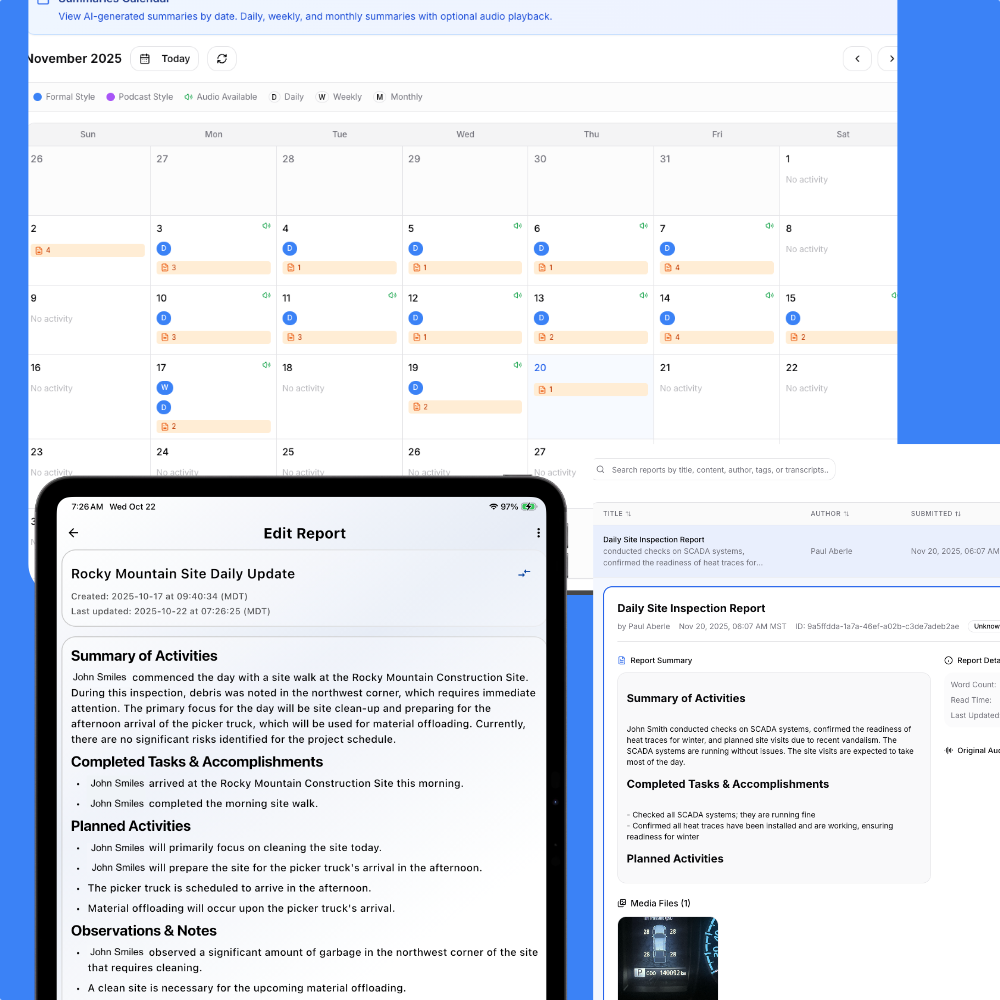
Every voice note becomes a structured jobsite report in your dashboard, sorted, timestamped, forwardable.
Software your crew will actually use
Every construction field reporting tool dies the same death: the crew won't adopt it. Dropdown menus, required fields, logins that time out, frontline workers route around all of it, and within a month the "system of record" is texts again. SpeakEzee asks your team for the one thing they already do naturally: talk about the day. Adoption isn't a rollout project. It's a thirty-second habit.
30 sec
per crew member, per day
0
training sessions required
1
structured report in your inbox
Any language on the crew. One language in the report.
The best field update is the one given in the words that come naturally. A crew member reports in Spanish, Punjabi or Tagalog; the structured report reaches you in English. Nobody writes in their second language, and nothing gets lost between the two. We wrote the full story: site reports from a crew that doesn't speak English.
Common questions from crews and their managers
Will my crew actually use this?
That's the whole design: one button, talk for thirty seconds, done. There are no forms to fill, nothing to type, and no training session, adoption is a habit, not a rollout project.
What does a worker actually do at the end of a shift?
Open the app, hit record, and say what happened: what got done, what's blocked, what's needed tomorrow. Snap photos if it helps. The AI does all the structuring.
What about crew members who aren't comfortable with technology?
If they can make a phone call, they can use SpeakEzee. There is exactly one thing to do in the app: press the button and talk.
Does it work without cell coverage?
Yes, the app is offline-first. Workers record in basements, warehouses, or remote sites with zero signal, and everything syncs automatically once the phone reconnects.
What if my crew speaks different languages?
Each worker speaks in the language that comes naturally. SpeakEzee auto-detects it and delivers every field report to you in English, nothing gets lost between languages.
What shows up on my side?
A structured jobsite report per worker in your web dashboard: tasks, blockers, photos and timestamps, plus AI summaries across the whole team. Same login works on web and mobile.
Give your crew a report they'll actually file
Free to start. No credit card required.
Questions first? Talk to us · See pricing
More from SpeakEzee
Daily Site Reports
Crew voice notes become structured daily reports, tasks, blockers and photos sorted.
Voice-to-Text Site Reports
Speak the report; get a structured document, not a raw transcript.
Multilingual Crew Reports
Site reports from a crew that doesn't speak English. Any language in, English out.